Free Spins and Low-Deposit Offers: What UK Players Should Actually Look At in 2026

Most bonus headlines look generous until you run the numbers, which is why our breakdown of the 100% casino bonus in the UK for 2026 examines the real maths behind match offers and the hidden terms that quietly reduce their value. The same scrutiny applies to spin-based promotions: our review of 120 and 100 free spins with no deposit in the UK weighs their genuine worth, key terms and the top casinos offering them.

If you prefer smaller bundles, our guide to 20, 25, 50, 100 and 200 no-deposit free spins compares the maths, withdrawal caps and top operators across the full range, while the audit of 30, 50, 100 and 150 free spins calculates the real expected value and ranks the casinos behind each tier. For larger headline offers, see the 2026 report on 150 free spins with no deposit, covering wager-free audits and operator rankings, the assessment of 200 free spins no-deposit deals with full wagering maths and top offers, and the breakdown of 250 free spins no-deposit promotions, including the maths, top casinos and bonus terms.

For readers focused on a single figure, the dedicated audit of 120 free spins no deposit provides a mathematical review, real terms and an operator-by-operator breakdown. Finally, if a deposit is on the table, small-stakes options matter: the guide to £4 minimum deposit casinos covers payment rails, spin maths and the best sites, and the review of 5 pound minimum deposit casinos sets out the real maths, bonuses, payments and top platforms.

Explore Our In-Depth UK Casino Guides

If you are hunting for the most generous welcome offer of the year, our breakdown of 500 free spins no deposit UK 2026: the maths, terms, and tested casinos shows exactly which promotions survive a close reading of the small print. Table-game enthusiasts should consult our audit of American roulette online casinos in the UK for 2026, covering table limits, odds, and platform quality before placing a single chip on the double zero.

Privacy-conscious players will find our review of anonymous crypto casinos in the UK for 2026, with no-KYC platforms, payout maths, and real privacy benchmarks an essential read, while crash-game fans can compare the best Aviator casino sites in the UK for 2026, complete with RTP maths and real-money stress tests against a second perspective: top Aviator platforms for the UK in 2026, including Spribe RTP maths and real bankroll traps. For reel spinners, we have examined the best 5-reel slots in the UK, from RTP maths to demo access and platform audits in one comprehensive guide.

Devotees of classic European design have three dedicated resources: start with the best Amatic online casinos in the UK for 2026, featuring a full Amanet RTP breakdown and slot maths, then read our Amatic casino guide for the UK, covering slot maths, lobbies, and real value, and finally check the best Amatic online casinos in the UK, with slots, RTP maths, bonuses, and payouts to see how the offers stack up. Mobile players should not miss our technical review of the best Android casinos in the UK for 2026, with benchmarks, real-money apps, and payout maths to make sure your handset keeps pace with your bankroll.

Our 2026 Guides to Smarter Online Casino Play in the UK

If you play mostly on your phone, start with our review of the best Android casinos in the UK for 2026, covering native apps, PWAs and real payout maths, then compare it with the broader product verdict on Android casino app performance and payout calculations before you commit to a single lobby. Slot fans should check our audits of Betsoft casinos with RTP checks and bonus math for 2026 and BGaming platforms, their slots and RTP mathematics, alongside the deep dive into Blueprint Gaming titles, Jackpot King mechanics and platform quality in 2026, and the round-up of cascading slot games with their RTP profiles and top UK lobbies. Live table enthusiasts can read our assessment of Evolution Gaming studios, payouts and the real maths behind 2026 offerings, while bingo players will find hybrid rooms and honest bonus calculations in the guide to the best bingo casinos in the UK for 2026. Finally, if you are choosing your welcome deal, our breakdown of the best casino sign-up bonuses in the UK for 2026, tested and mathematically assessed pairs well with the stricter analysis in no-wagering sign-up offers, real EV maths and the terms-and-conditions traps to avoid.

Smarter Casino Choices for UK Players in 2026

Finding the right operator starts with understanding how quickly your winnings actually reach you, which is why our guide to the best fast payout online casino UK platforms covering speed, payout math, and top lobbies remains essential reading. Bonuses deserve the same scrutiny, and our review of the best first deposit bonus casino UK offers with real value and wagering math breaks down which welcome packages genuinely pay.

Game selection matters just as much as the bonus. Provider-focused audits include the best Habanero online casinos UK with RTP profiles and bonus math and the best Inspired Gaming online casinos in the UK with RTP audits and slot mechanics, while our best highest RTP slots UK 2026 guide covering verified builds and provider audits highlights the most generous return models. If you prefer steadier sessions, the best low volatility slots UK 2026 roundup of high-RTP games and math models is worth a look; risk-takers should instead read our best high volatility slots UK 2026 feature on real RTP audits and bankroll math.

Table game fans are covered too, thanks to our comparison of the best live casino UK 2026 operators by table math and stream quality. When it comes to promotions, the best low wagering casino bonus UK 2026 analysis of real EV and terms shows which deals offer genuine expected value, and players open to offshore brands can consult our breakdown of the best international casinos for UK players in 2026 comparing product, math, and terms before deciding where to sign up.

Our 2026 Casino Guides for UK Players

If you are comparing offshore options this year, our Best Offshore Casinos for UK Players in 2026: Product Mechanics, RTP Audits, and Payout Math explains how non-UKGC sites actually work before you deposit a penny. For home-grown offers, the Best Online Casino Welcome Bonus UK 2026: Real Value, Wagering Math & Top Offers Ranked guide breaks down wagering requirements so you can judge a headline figure on real terms rather than hype.

Chasing life-changing prizes? Start with Best Online Casinos with Big Jackpot Slots in 2026: UK Mathematical & Payout Guide, which weighs progressive pots against expected value. If you prefer a particular studio, our series audits each provider in turn: Best Online Casinos With Big Time Gaming Slots UK (2026): RTP Audit, Payout Speeds, and Volatility Math covers Megaways mechanics; Best Online Casinos With Jackpot King Slots UK (2026 Data & RTP Audit) examines the BluePrint-linked network; and Best Online Casinos with Nolimit City Slots in the UK: RTP Audits, Payout Caps & Math Breakdown highlights the volatility extremes this studio is known for.

Three further audits complete the picture: Best Online Casinos with Play'n GO Slots in the UK (2026): RTP Math, Top Platforms and Bonus Reality for one of the most consistent UK lobbies, Best Online Casinos with Push Gaming Slots in the UK (2026): Verified RTP & Payout Benchmarks for benchmarked return-to-player figures, and Best Online Casinos with Red Tiger Slots in the UK (2026): RTP Configurations, Jackpot Math, and Platform Audit for how configuration ranges affect real payouts. Finally, the Best Online Casinos with Thunderkick Slots in the UK (2026): RTP Math, Lobbies, and Terms round-up closes with the terms and conditions worth reading twice before you sign up.

Smarter casino choices for UK players in 2026

Finding genuine value in the online casino market starts with understanding the maths behind the games. Our guide to the best online slots payout percentage in 2026 walks through verified UK RTP benchmarks so you can see exactly how much each title is designed to return over time, while the companion piece on the best RTP casino slots in the UK exposes the hidden lobby cuts that some operators apply to otherwise familiar games.

If you prefer titles with life-changing ceilings, our review of the best progressive jackpot slots in the UK breaks down the RTP math and payout limits behind the biggest prize pools, and fans of specific studios can compare best online casinos with Yggdrasil slots to find where that provider's mechanics are offered at their full settings.

Choosing where to play matters as much as choosing what to play. We benchmark the best real money online casinos in the UK for 2026 on fast payout engineering and cashier performance, alongside a broader product breakdown of the best real money online casinos covering payout speed and RTP audits across the market.

Payment routes deserve equal scrutiny. Players who want card-based deposits can read our comparison of casino sites that accept credit cards for the real costs involved, or the practical breakdown of casino sites that accept debit cards, which examines FX spreads, limits and game math. Crypto users are covered too, with a Cardano casino comparison for the UK that weighs payouts and true value against traditional methods.

Finally, for those looking beyond the national self-exclusion scheme, our analysis of casino sites not registered with GamStop lays out the real bonus maths and platform differences so you can decide whether those operators suit your play style.

Choosing a UK Casino Payment Method That Actually Suits You

Picking where to deposit is just as important as picking where to play, and the options vary far more than most players expect. If you want a modern e-wallet with wide acceptance, our breakdown of Casino Sites That Accept ecoPayz in the UK: Practical Comparison, Fees, and Payout Reality sits alongside a shorter, cashiers-focused look at Casino Sites That Accept ecoPayz in the UK: Fees, Cashiers, and Top Picks, so you can compare charges before committing a penny.

Jeton occupies a similar niche for players who prefer app-based wallets, and the guide to Casino Sites That Accept Jeton in the UK: Cashier Mechanics, Limits, and Real Yield explains exactly how its deposit caps and withdrawals behave in practice. Prepaid fans, meanwhile, should read Casinos That Accept AstroPay in the UK: Practical Guide, Payout Math, and Top Picks to see whether the voucher route suits their banking habits.

Traditional methods still have their place. A Casinos That Accept Bank Cheque UK 2026: Clearing Reality, Limits & Top Sites review covers why cheques clear slowly and who they still suit, while Casinos That Accept Bank Transfer UK 2026: Real Settlement Speeds, Limits, and Fee Math shows how straight transfers measure up on speed and cost.

For smaller, mobile-first deposits, the analysis of Casinos That Accept Boku UK 2026: Real Limits, Hidden Gateway Fees, and Payout Math is essential reading, as is the walkthrough of Casinos That Accept Citadel UK 2026: Payment Status, Audits & Direct Banking Alternatives for anyone weighing up direct banking options. Legacy wallets are not forgotten either: Casinos That Accept Click2Pay UK 2026: Current Status, Payment Math, and Verified Alternatives clarifies where that service stands today, and Casinos That Accept Diners Club UK 2026: Payment Reality, Top Alternatives & Cost Math explains what card users should expect. Whichever route you favour, reading up first will spare you unnecessary fees and slow payouts later.

Choosing a Payment Method for UK Online Casinos in 2026

Before you deposit anywhere, it pays to understand how each banking rail actually behaves inside a UK cashier. Our guide to Casinos That Accept E-Wallets UK 2026: Clearing Speeds, Hidden Fees, and Bonus Traps explains why digital wallets remain the fastest option for withdrawals, while Casinos That Accept eCheck UK 2026: Clearing Mechanics, Fees, and Top Tested Sites and its companion piece on Casinos That Accept eCheque UK 2026: Clearing Mechanics, Real Costs, and Top Sites cover the paper-style cheque routes and the clearing delays you should budget for.

Some legacy methods have changed beyond recognition: Casinos That Accept Entropay UK 2026: Why the Original Card Is Gone and Which Rails Actually Work traces what replaced the pioneering virtual card, whereas Casinos That Accept Giropay UK 2026: Cashier Status, Fee Math & Best Instant Banking Alternatives assesses whether the German scheme still has a place in a British cashier. For continental players, Casinos That Accept iDEAL UK (2026): Technical Reality, Top Platforms, and Zero-Fee Alternatives breaks down the Dutch standard and its zero-fee substitutes.

North American rails and open banking add further nuance. Casinos That Accept Instadebit UK 2026: Status Check, Top Operators, and Real Alternatives and Casinos That Accept Interac in the UK (2026): Payment Mechanics, Operator Benchmarks, and Faster UK Equivalents examine how Canadian systems fare on this side of the Atlantic, while Casinos That Accept Klarna in the UK (2026): Open Banking Rails, Fees, and Payout Math looks at the buy-now-pay-later brand's pivot to account-to-account transfers. Finally, if you prefer a debit card, Casinos That Accept Maestro in the UK (2026): Gateway Audit, Payout Rules & Real Cost Data audits the gateway landscape and the withdrawal rules attached to it.

Payment Methods at UK Online Casinos: What Actually Matters in 2026

Choosing how to deposit and withdraw at an online casino affects far more than convenience — it shapes your payout speed, bonus eligibility and long-term cost. Traditional card players should start with our deep dive into casinos that accept Mastercard in the UK (2026): payouts, limits, FX costs and real value, which unpacks where card rails genuinely still make sense. If you bank with a digital-first provider, the guide to casinos that accept Monzo in the UK (2026) covering payment mechanics, top picks and real math explains why some operators reject these cards outright, while casinos that accept Revolut in the UK looks at payment rails, fee math and top platforms for anyone who wants multi-currency flexibility.

E-wallet users have their own trade-offs to weigh. Our review of casinos that accept Neteller in the UK for 2026 covers gateway limits, hidden fees and real payout speed, and the companion piece on casinos that accept PayPal in the UK for 2026 compares real payout speeds, limits and the bonus catch that often lurks behind headline offers. Prepaid fans can consult the breakdown of casinos that accept Neosurf in the UK for 2026, with real limits, payouts and bonus math, whilst those curious about a more regional rail should read casinos that accept POLi in the UK for 2026, covering availability, alternatives and real payment math.

Finally, speed-first and crypto-curious players are well served by the analysis of casinos that accept Pay N Play in the UK for 2026, covering instant bank casinos, payout speed and real value, and by two stablecoin-focused guides: casinos that accept Solana in the UK for 2026, with tested platforms, payout speed and true cost, and the practical walkthrough of casinos that accept Tether in the UK for 2026, covering rails, practical steps and an operator breakdown. Together, these ten guides give you a complete picture of what each payment method really costs — beyond the marketing.

Smarter Casino Choices for UK Players in 2026

Choosing a payment method matters just as much as picking a game, which is why our guide to casinos that accept UPAYCARD in the UK walks through deposit mechanics, limits and operator breakdowns, while our companion review of casinos that accept wire transfer in the UK explains clearing rails, fees and payout speeds. If speed is your priority, casinos that accept direct banking offer some of the fastest balances between convenience and withdrawal maths, and pay by mobile casinos in the UK show how carrier billing works in practice, bonus maths included.

Prefer to skip the paperwork altogether? Our test of online casinos with no registration documents instant play, free slots and the real friction you can expect. Meanwhile, bonus hunters can dig into the hard numbers behind each tier: the 200% bonus breakdown, the 300% bonus audit, the 400% bonus maths and top picks, and the 600% bonus value analysis all reveal which headline offers actually pay off after wagering requirements.

Finally, loyalty rewards deserve attention too — our round-up of UK casino birthday bonuses weighs their genuine value against the wagering terms attached, so you know exactly what to expect when your special day rolls around.

Technology

How the Connectivity HSSGamepad Works: Setup and Fixes

A Simple Guide to Connecting a Gamepad with Mobile Phones, PCs, Smart TVs, and Other Supported Devices

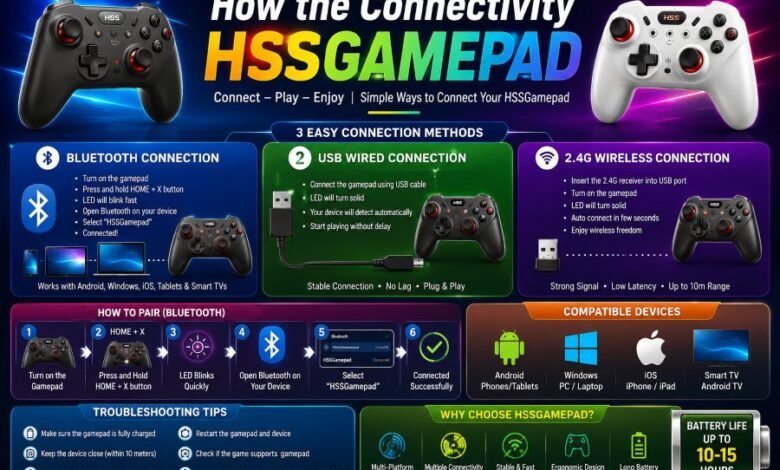
Introduction

The phrase “How the Connectivity HSSGamepad” usually refers to how an HSS-style game controller communicates with a phone, computer, tablet, television, or gaming device.

A gamepad needs a stable connection to send every button press and joystick movement to the game. When that connection is working correctly, gameplay feels smooth and responsive. When it is weak, the player may experience lag, missed commands, unexpected disconnections, or pairing errors.

Online pages describe HSSGamepad connectivity in different ways, and a clearly verified manufacturer specification is difficult to identify. Some third-party guides mention Bluetooth, USB cables, and 2.4 GHz wireless receivers, but the exact connection options may differ between controller models. Always check the instructions supplied with your own device before choosing a connection method.

What Does Connectivity HSSGamepad Mean?

Connectivity HSSGamepad means the system used to connect the controller to another device.

This system carries information from the controller to the game. For example, when you press the jump button, the gamepad sends that command to your phone, PC, or television.

A good connection should provide:

  • Fast button response
  • Stable gameplay
  • Accurate joystick movement
  • Fewer disconnections
  • Simple device pairing
  • Minimal input delay

The actual experience depends on the gamepad model, its connection mode, the receiving device, and the game being played.

Common HSSGamepad Connection Methods

Third-party guides commonly associate the HSSGamepad keyword with three possible connection methods. These options should not be treated as confirmed features of every controller carrying a similar name.

1. Bluetooth Connection

Bluetooth allows a controller to connect without a cable or separate receiver.

It is commonly used with:

  • Android phones
  • Android tablets
  • Windows computers
  • iPhones and iPads
  • Some smart televisions

Bluetooth is convenient because the player can sit away from the screen. However, the controller must support the receiving device and the game must accept controller input.

Bluetooth technology operates in the 2.4 GHz radio band. Wi-Fi networks and other wireless products may use the same band, so nearby devices can sometimes affect connection quality. Bluetooth includes technologies designed to reduce interference, but distance, walls, congestion, and hardware quality can still influence performance.

2. USB Wired Connection

A wired connection uses a compatible USB cable between the gamepad and the device.

This method can be helpful when:

  • Bluetooth is unavailable
  • The wireless signal is unstable
  • The controller battery is low
  • The player wants a direct connection
  • The device is not finding the controller

Windows usually detects connected hardware automatically, although some controllers may need a driver, a different input mode, or manual configuration.

A cable does not guarantee that every game will recognise the controller. Compatibility still depends on the controller, operating system, cable, port, and game.

3. Wireless USB Receiver

Some gamepads use a small USB receiver, often called a dongle.

The receiver is inserted into a computer, smart television, or another supported device. The controller then communicates wirelessly with that receiver.

This type of connection can be useful when the device has no built-in Bluetooth. However, not every HSS-style gamepad includes a receiver, and receivers from different controllers may not be interchangeable.

How to Connect HSSGamepad to a Windows PC

The exact pairing buttons depend on the controller model. Use its manual to place it in pairing mode.

For a general Bluetooth connection on Windows:

  1. Charge or power on the gamepad.
  2. Put the controller into Bluetooth pairing mode.
  3. Open Settings on the Windows computer.
  4. Select Bluetooth & devices.
  5. Turn Bluetooth on.
  6. Select Add device.
  7. Choose Bluetooth.
  8. Select the controller when its name appears.
  9. Wait for Windows to complete the connection.
  10. Open a supported game and test the buttons.

Microsoft states that a Windows device must support Bluetooth before it can pair with a Bluetooth accessory. A USB Bluetooth adapter may be used on a computer that does not have built-in Bluetooth.

When using a USB cable, connect the controller directly to the computer and allow Windows time to detect it.

How to Connect HSSGamepad to Android

To connect a compatible Bluetooth gamepad to Android:

  1. Turn on the controller.
  2. Activate its correct Android or Bluetooth pairing mode.
  3. Open the phone’s Bluetooth settings.
  4. Tap Pair new device.
  5. Wait for the controller’s name to appear.
  6. Tap the name.
  7. Accept any pairing request.
  8. Open a game that supports external controllers.

Google explains that paired Bluetooth devices may reconnect automatically after the first successful pairing. Menu names and steps can vary according to the Android version and phone manufacturer.

A controller may connect to the phone but fail inside a game when the game itself does not support gamepad input.

How to Connect HSSGamepad to iPhone or iPad

First, confirm that the controller is compatible with iOS or iPadOS.

Then follow these general steps:

  1. Put the controller into its supported pairing mode.
  2. Open Settings on the iPhone or iPad.
  3. Tap Bluetooth.
  4. Turn Bluetooth on.
  5. Find the controller under available devices.
  6. Tap its name to pair it.
  7. Open a controller-supported game.

Apple advises users to follow the accessory manufacturer’s instructions when placing a third-party device into discovery mode. If the accessory does not appear, its manual should be checked for the correct pairing procedure.

Not every Bluetooth controller works with iPhones or iPads, even when it appears in the Bluetooth list.

How to Connect HSSGamepad to a Smart TV

Smart television support varies greatly between brands and operating systems.

A general setup may look like this:

  1. Open the television’s settings.
  2. Find Bluetooth, accessories, remotes, or connected devices.
  3. Put the gamepad into pairing mode.
  4. Scan for nearby accessories.
  5. Select the controller.
  6. Open a cloud gaming or controller-supported application.
  7. Test every button.

For a receiver-based model, connect its USB receiver to a supported television port. Remember that a television detecting the controller does not mean every app will accept it.

Why Is the HSSGamepad Not Connecting?

Several common problems can prevent a gamepad from connecting.

The Battery Is Low

A controller with very little power may fail to enter pairing mode or may disconnect during play.

Fully charge it before troubleshooting.

The Wrong Pairing Mode Is Selected

Some controllers offer separate modes for Android, iOS, Windows, or different input standards.

Using the wrong mode may cause the controller to appear but not work correctly. Follow the model-specific button combination printed in its manual.

It Is Connected to Another Device

The gamepad may automatically reconnect to a previously paired phone, tablet, or computer.

Turn off Bluetooth on the old device or remove the gamepad from its saved-device list.

Old Pairing Information Is Causing a Conflict

Delete or forget the controller from the device’s Bluetooth settings. Restart both devices and complete the pairing process again.

Apple and Google both provide options to forget or unpair a previously connected Bluetooth accessory.

The Controller Is Too Far Away

Move the controller closer to the receiving device during pairing. Remove large physical barriers and avoid placing the receiver behind heavy furniture or metal objects.

Wireless Interference Is Affecting the Signal

Bluetooth shares the 2.4 GHz band with technologies including Wi-Fi. Multiple nearby wireless devices can create a busy radio environment.

Try these steps:

  • Move closer to the device
  • Temporarily disconnect unused Bluetooth products
  • Move away from a crowded Wi-Fi router
  • Keep the receiver in an open position
  • Avoid placing it beside other wireless adapters

Windows Drivers Need Attention

On Windows, a driver or system configuration issue can prevent successful communication.

Microsoft recommends checking that the accessory is powered, charged, and within range. Windows 11 users can also run the Bluetooth troubleshooter through the Get Help application.

The Game Does Not Support Controllers

A successful Bluetooth connection only shows that the operating system can see the controller.

The individual game must also support gamepad controls. Check the game’s settings, store listing, or official support information.

How to Reduce HSSGamepad Input Lag

Input lag is the delay between pressing a button and seeing the action on screen.

To reduce possible delay:

  • Fully charge the controller
  • Stay close to the connected device
  • Remove unnecessary wireless accessories
  • Use the correct controller mode
  • Update the computer’s Bluetooth driver
  • Close demanding background applications
  • Test a compatible wired connection
  • Use a different USB port when using a receiver
  • Check whether the game has controller settings
  • Avoid unofficial drivers from unknown websites

Microsoft provides Device Manager instructions for updating Bluetooth drivers in Windows. Drivers should preferably come from Windows Update or the computer manufacturer.

Bluetooth, Receiver, or Wired: Which Is Better?

The best method depends on the user’s device and needs.

Connection Main Benefit Possible Limitation
Bluetooth No cable or receiver required May face interference or compatibility issues
USB receiver Simple wireless connection on supported devices Requires a free USB port and matching receiver
Wired USB Direct and dependable physical link Cable limits movement

Bluetooth is useful for mobile gaming and casual play. A receiver may be convenient for computers or televisions. A wired connection can be a practical troubleshooting option when wireless pairing fails.

Always choose a mode officially supported by both the controller and the receiving device.

Safety and Compatibility Tips

Do not download random firmware, drivers, or pairing applications simply because they use the HSSGamepad name.

Before installing software:

  • Check the controller packaging
  • Find the real manufacturer name
  • Verify the exact model number
  • Use the manufacturer’s official support page
  • Avoid unknown executable files
  • Scan downloaded files with trusted security software
  • Never share passwords or payment information with unofficial support pages

Because the HSSGamepad term is used inconsistently online, users should rely on the model number and original manual rather than assuming all similarly named devices work in the same way.

Frequently Asked Questions

What is Connectivity HSSGamepad?

It is a search phrase used for information about connecting, pairing, configuring, and troubleshooting an HSS-style game controller.

Does HSSGamepad work with every phone?

No. Support depends on the exact gamepad model, phone operating system, connection standard, and game.

Can I connect HSSGamepad through Bluetooth?

Possibly, if the specific controller includes Bluetooth and supports the receiving device. Check the product manual before pairing.

Why does the controller connect but not work in games?

The game may not support controllers, the wrong input mode may be active, or the buttons may need to be configured inside the game.

Can I use HSSGamepad with an iPhone?

Only when the exact controller supports iOS or iPadOS. A controller appearing in Bluetooth settings does not guarantee full gaming compatibility.

How can I fix repeated disconnections?

Charge the controller, remove old pairings, restart both devices, select the correct mode, reduce wireless interference, and update trusted system drivers.

Is a wired connection better than Bluetooth?

A wired connection can provide a direct link and may help when Bluetooth is unstable. However, performance and compatibility depend on the controller and device.

Final Thoughts

Understanding how the Connectivity HSSGamepad works starts with identifying the exact controller model.

A gamepad may connect through Bluetooth, a USB receiver, or a cable, but online information does not confirm that every product associated with the HSSGamepad keyword supports all three methods.

Begin with the original manual. Charge the controller, select the correct mode, place it near the receiving device, and follow the official Bluetooth settings for Windows, Android, or iOS.

When the connection fails, remove old pairings, restart the devices, check game compatibility, and test another supported connection method. These simple steps can solve many common pairing, lag, and disconnection problems without using unsafe third-party software.


Spice Weekly

Related Articles

Leave a Reply

Your email address will not be published. Required fields are marked *

Back to top button